
E-commerce warehouses in Vietnam are hitting scale constraints: 1,000+ daily orders, 500+ SKUs, multiple sales channels (Shopee, Lazada, Tiki, direct website). Manual pick-pack-ship workflows break down at this volume — pick errors climb above 5%, pack time per order exceeds 4 minutes, and carrier label printing becomes a daily fire drill.
A modern warehouse management system (WMS) automates the repetitive parts while giving warehouse staff structured workflows to follow. The result: over 99% pick accuracy, under 2 minute pack time, and same-day shipping for orders received before 3pm.
What a WMS actually does
At its core, a WMS orchestrates three workflows:
1. Pick — getting items from shelves
Old way (paper pick lists):
Warehouse manager prints a list of orders, highlights SKUs needed, hands to picker. Picker walks aisles, grabs items, checks them off manually. Errors happen when picker misreads handwriting or picks the wrong variant (size, color).
WMS way:
System generates optimized pick routes (cluster orders by shelf location). Picker uses mobile scanner to scan barcode on shelf, then barcode on item. Scanner beeps green if correct, red if wrong SKU. No paper, no guesswork.
Outcome: Pick error rate drops from 5–8% to under 1%.
2. Pack — boxing items for shipment
Old way:
Packer receives picked items, chooses a box size by eye, wraps items in bubble wrap, tapes box, weighs it, manually writes shipping label, sticks label on box.
WMS way:
System suggests optimal box size based on item dimensions. Packer scans each item to confirm it belongs to this order. System prints pre-formatted carrier label with barcode. Packer sticks label and moves box to shipping zone.
Outcome: Pack time per order drops from 4–6 minutes to 1.5–2.5 minutes.
3. Ship — handing off to carriers
Old way:
Warehouse manager collects all packed boxes, manually enters each order into carrier website to get tracking number, prints labels one by one. Carrier picks up, warehouse manager manually marks orders as “shipped” in the e-commerce platform.
WMS way:
System bulk-generates carrier labels for all packed orders in one click. Each label has a tracking number. When carrier picks up, warehouse scans boxes as “shipped” — this auto-updates the e-commerce platform via API.
Outcome: Ship-out time drops from 3 hours to 20 minutes for 200 orders.
Case study: Hanoi-based D2C warehouse
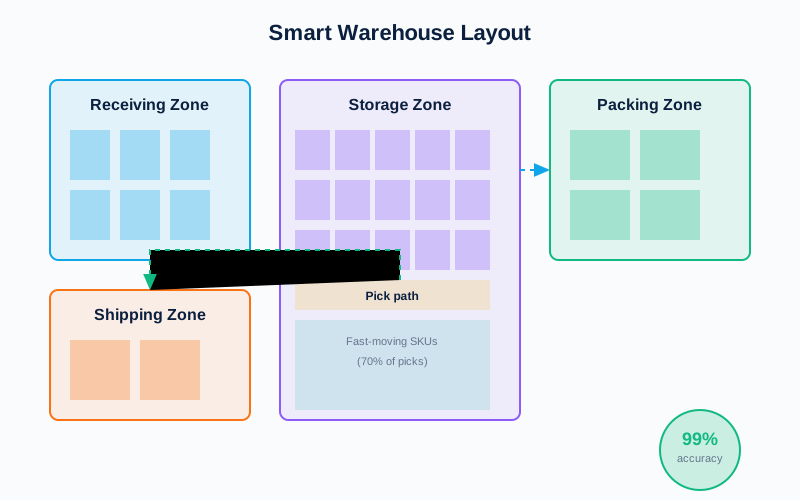
Profile:
- 350+ SKUs (fashion and lifestyle)
- 800–1,200 orders/day from Shopee, Lazada, and Shopify
- 4 warehouse staff (2 pickers, 1 packer, 1 QC/ship-out)
Before WMS (paper-based):
| Metric | Value |
|---|---|
| Pick error rate | 6.2% |
| Pack time per order | 4.5 minutes |
| Daily ship-out cutoff | 2pm (to finish by 5pm) |
| Wrong-item complaints per month | 48 |
After Woka WMS (6 months in production):
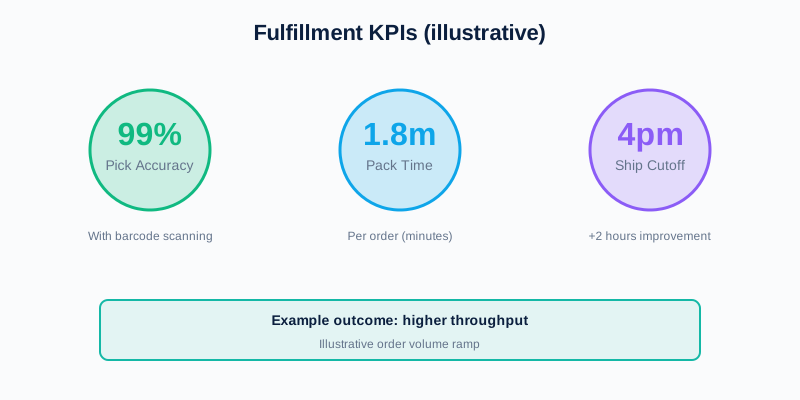
| Metric | Value | Change |
|---|---|---|
| Pick error rate | 0.8% | -87% |
| Pack time per order | 2.1 minutes | -53% |
| Daily ship-out cutoff | 4pm | +2 hours |
| Wrong-item complaints per month | 4 | -92% |
Key enabler: Barcode scanning at both pick and pack stages eliminated misreads. Automated carrier label generation freed up 2 hours per day that staff previously spent on manual data entry.
Technical architecture
Our WMS consists of:
Core components
- Inventory management — Real-time stock levels per SKU per warehouse location; sync with e-commerce platforms via API
- Order routing — Route incoming orders to the warehouse with stock and capacity; support multi-warehouse fulfillment
- Wave picking — Group orders by zone and priority; generate optimized pick routes to minimize warehouse travel distance
- Packing validation — Scan each item before packing to confirm it belongs to the order; flag errors in real-time
- Carrier integration — Generate shipping labels for GHTK, GHN, Viettel Post, J&T Express via API; track shipment status
- Returns processing — QC inspect returned items; restock, refurbish, or dispose based on condition
Tech stack
- Frontend: React web app for warehouse staff and ops dashboard
- Backend: NestJS + MySQL + Elasticsearch (for SKU search and order lookup)
- Mobile: React Native scanner app for pickers (barcode scan, pick confirmation)
- Integrations: REST APIs to Shopee, Lazada, Tiki, Shopify, WooCommerce; carrier APIs for label generation
Performance
- Order processing capacity: 10,000 orders/day per warehouse on standard cloud VM
- Latency: p95 < 50ms for order creation, < 200ms for inventory sync
- Uptime: 99.8% over past 12 months
Common pain points and solutions
Pain 1: Cycle count accuracy
Problem: Physical inventory doesn’t match system inventory. Causes overselling (sell items that are out of stock) or underselling (show out-of-stock when items exist).
Solution: Perpetual cycle counting — system schedules daily counts of high-velocity SKUs and weekly counts of slow-movers. Discrepancies trigger investigation (theft, damage, miscounts).
Pain 2: Multi-channel inventory sync
Problem: Sell the same SKU on Shopee and Lazada. When item sells on Shopee, need to decrement stock on Lazada immediately to avoid overselling.
Solution: WMS is the single source of truth for inventory. When an order comes in from any channel, WMS decrements stock and pushes updated stock levels to all channels within 60 seconds.
Pain 3: Slow-moving inventory identification
Problem: Some SKUs sit in warehouse for 6+ months, taking up space and capital.
Solution: WMS tracks SKU velocity (units sold per week). Dashboard flags SKUs with under 1 unit/week velocity for over 3 months. Ops team can run clearance sales or return to supplier.
Pain 4: Returns workflow
Problem: Returned items pile up in a corner, not restocked for weeks. This creates phantom stock (system says in stock, but physically not on shelf).
Solution: Structured returns workflow in WMS — QC scans returned item, marks condition (new, used, damaged), system auto-restocks if new, or routes to refurbish/dispose queue.
ROI calculation
Cost to deploy WMS for a warehouse with 500–1,000 orders/day:
- Initial setup: $8,000 (2 weeks inventory migration + 1 week staff training + hardware procurement: 2 barcode scanners, 1 label printer)
- Monthly SaaS fee: $600 (includes cloud hosting, API usage, support)
Benefit:
- Reduce pick errors: 6% → 1% error rate saves ~$4,000/month in wrong-item replacements and customer support time
- Increase throughput: Same staff can now handle 1,200 orders/day (was 800) without hiring = $6,000/month additional revenue (assuming $5 profit per order)
- Faster ship-out: 2-hour cutoff extension allows capturing late-day orders = $2,000/month additional revenue
Payback period: 1 month. After that, net benefit is $11,000+ per month.
When WMS doesn’t make sense
Three scenarios where a WMS is overkill:
- Low order volume (under 100/day) — Manual workflows are fast enough; WMS overhead exceeds benefit
- Single SKU or very simple catalog — If you only sell 5 products, pick errors are rare even without barcode scanning
- Highly customized orders — If every order requires custom assembly or kitting, structured workflows can’t capture the variability
For these cases, stick with spreadsheets or lightweight inventory tracking (Google Sheets + Zapier automation).
Next steps
If you’re running a warehouse with over 200 orders/day and seeing over 3% pick error rate or over 3 minute pack time, contact us for a WMS scoping conversation. We’ll audit your current workflows and give you a projected ROI before any commitment.